
Key takeaways
- The finance problem: AI adds variable usage to fixed seat costs. Employees and automated workflows can start the meter across providers, while finance receives the combined bill later.
- One company view: AI Spend Control shows cost, requests and adoption together over time across your providers (Anthropic and OpenAI).
- Clear allocation: Finance can trace a movement to the product category, model, team, person, API key or workflow behind it.
- Local by design: The application runs on your computer. It does not retrieve prompts or responses, and neither your Admin API keys nor the returned spend data are sent to Moss.
AI spend increasingly behaves like company card spend in the sense that it can begin anywhere in the business, but finance only sees where the money went after it has been spent. Companies now pay not only for fixed seats, but also for usage triggered by employees and automated workflows managed by IT, often across several providers such as OpenAI and Anthropic.
As a result, costs originate across the business and IT, while responsibility for understanding and managing the bill still lands with finance. Finance therefore needs a clearer approach to AI spend management, with one view of how AI costs are developing and what is driving them.
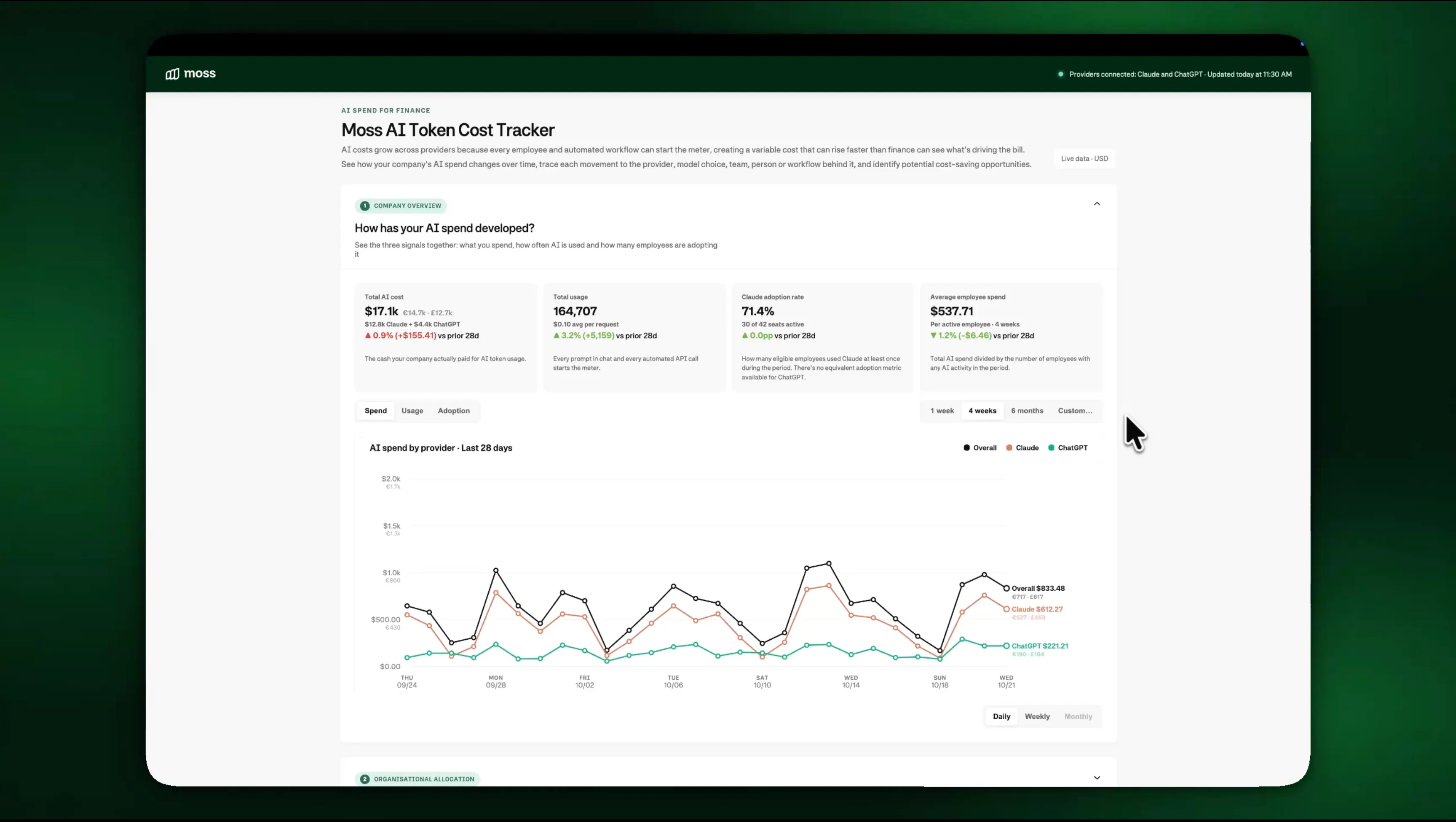
To help solve this issue, we built Moss AI Token Cost Tracker. It helps bring provider data into one local company view, show spend, requests and adoption over time, and trace cost movements back to the product category, model, team, person, API key or workflow behind them.
Follow the video tutorial and step-by-step instructions for your system below:
Getting started
Works with Claude Code, OpenAI's Codex, and other terminal-based AI coding agents. Copy this prompt and paste it into your agent - it will clone the repo, install dependencies, and start the app for you.
Clone and set up the moss-ai-token-cost-tracker tool for me. Act as my setup assistant using your file system and terminal access:
1. First check whether the current folder (or a `moss-ai-token-cost-tracker` subfolder) already contains this tool (look for server.mjs and index.html). If it's already there, run `git pull` inside that folder to get the latest changes, then skip straight to step 3.
2. Otherwise, clone the repo:
   git clone https://github.com/getmoss/moss-ai-token-cost-tracker
   then work from inside that folder, and check whether Git, nvm, and the Node.js version this repo's README requires are installed, installing or switching to whatever is missing.
3. Ask me whether I want to run it in production mode (connecting my real accounts with API keys) or demo mode (mocked data, so I can just see how it looks without any API keys). Wait for my answer before continuing.
4. Double check that everything needed is set up correctly, and then run `npm start` for production mode, or `npm run demo` for demo mode, based on my answer.
5. Watch the terminal output for errors. If something fails, diagnose the root cause, explain it to me in plain language, and either fix it or tell me exactly what to run.
6. Tell me the URL to open in my browser once the server is running.
7. Later, if I ask you to stop or restart the tool, do that for me.

Important: never read, print, or send the contents of my .env file, and never share any API keys or company data outside this terminal session.
How AI pricing works: Seats plus usage
AI is increasingly priced through a mix of fixed seats and usage, with that usage measured in tokens, the small units of text a model reads and generates. As a rough guide, 1,000 tokens equal 750 plain English words.
Costs rise and fall with many different factors including adoption, request volume, prompt and response length, model choice and token type. Premium models, long context, retries and multi-step agents can push overall AI token cost higher. On the other hand, shorter inputs, cheaper models and cached tokens can lower costs, meaning the same number of requests can produce very different bills.
AI spend is the company card problem, spread across providers
The first problem for finance is visibility, as companies often use several AI providers for different workloads, such as Claude for coding and logic-heavy work and ChatGPT for creative work and image generation. Moss's 2026 European SaaS & AI Spending Report found that 67% of companies that tried both OpenAI and Anthropic still use both. Yet each provider dashboard shows only its own part of the bill, making both the company total and the underlying metrics difficult to analyse.
Then comes a problem that we're very familiar with at Moss. When many people can start spending, finance needs visibility before the statement arrives. With AI, employees can start the meter, but so can IT-managed workflows that make calls, retry and run in the background. By the time finance sees the combined bill, the money has already been spent.
That split between who creates the cost and who owns the budget is why AI token spend is becoming a finance problem. A company-wide cap is too blunt because it can stop useful work or interrupt customer-facing services. Instead of fragmented AI FinOps setups, finance and IT need one view across providers and enough detail to trace each movement to the product, model, team, person, API key or workflow behind it.
This problem is what led us to build the Moss AI Token Cost Tracker. Once you've connected your AI tools, our tracker combines the data in one view designed specifically for finance. It surfaces the metrics that matter, helps finance spot changes, and ultimately understand what drove it.
How does it work?
AI Spend Control is a local application that connects directly to the Anthropic and OpenAI Admin APIs, combines the same usage and cost data from their separate dashboards on your computer, and brings LLM cost management into one view designed for finance rather than IT administration.
By surfacing the metrics that matter, it helps finance see how AI costs are developing and understand what is driving each change.
The first version answers the two questions finance needs first:
- How are our AI costs developing?
- What is driving the movement?
For now, it focuses on visibility and allocation, giving finance enough context to take a specific question to the right owner.
1. See how AI spend develops over time
The company overview tracks three signals over time:
- Total AI cost: The spend returned by the connected provider APIs.
- Usage: The number of employee and automated requests sent.
- Adoption: The share of employees actively using AI via seat utilisation.
You can view the company total, split it by provider and compare the current period with the previous one. This matters because the signals tell different stories when read together.
If spend and requests rise together, the company probably used more AI. If spend rises while requests stay flat, the model mix, request size or effective rate may have changed. If adoption rises, more people have started using the tools, but finance can still check whether usage is concentrated in a small number of teams or workflows.
The model view also shows current public input, output and cached-token prices beside actual usage. Those list prices are reference points, not a reconstruction of every historical charge. Contracts, caching, processing modes and provider changes can all affect the rate a company actually paid.
2. Trace what drove the cost
AI Spend Control lets finance allocate the company total across its organisation and start investigating where costs were incurred through four practical lenses:
- Product category: Break spend down by employee chat, coding tools, customer-facing features and internal automations. Comparing spend and usage across them shows which type of AI activity contributed most to a change.
- AI model: Compare spend and requests by model alongside current token prices. If requests remain stable while cost rises, check whether usage shifted to a more expensive model and whether the task needs that level of capability.
- Team and top spender: See where usage is concentrated and compare individuals with the normal pattern for their role and team. Long sessions and repeated retries can increase spend, but a high number is a reason to investigate the work, not evidence that someone is wasting money.
- API key and workflow: Find automated workloads that keep making calls without a person actively using them. Rapid growth in spend or token volume, repeated retries or one unusually active key can point to extra steps or a loop that needs technical limits. Our guide to spending controls for AI agents covers the controls that can follow.
The provider APIs offer different breakdowns. OpenAI can group API usage by project, user, API key, model and processing mode. Anthropic supports breakdowns by API key, workspace, model and other usage attributes. Which attribution is visible in the tracker depends on the data the provider and plan provide.
Each view ranks entries by spend and shows their share of the total, change from the previous period, request volume and cost per one million tokens. Once a spike or anomaly is detected in the company total, comparing these four views helps finance identify which area is most likely driving the increase.
Finance does not need to rewrite prompts or configure caching itself. It needs to know who should own the next conversation, i.e. the relevant team for a model choice or unusual employee usage, or IT and engineering when an agent or workflow needs stronger guardrails. This supports practical AI cost optimisation and helps control future costs without stopping useful AI work across the company.
How to install and connect Moss AI Token Cost Tracker from GitHub
Follow the video guide for your system (Mac or Windows) below. It walks you through each step, including exactly which commands to copy and paste. If you experience any issues, ask your IT team for help.
Getting started
Works with Claude Code, OpenAI's Codex, and other terminal-based AI coding agents. Copy this prompt and paste it into your agent - it will clone the repo, install dependencies, and start the app for you.
Clone and set up the moss-ai-token-cost-tracker tool for me. Act as my setup assistant using your file system and terminal access:
1. First check whether the current folder (or a `moss-ai-token-cost-tracker` subfolder) already contains this tool (look for server.mjs and index.html). If it's already there, run `git pull` inside that folder to get the latest changes, then skip straight to step 3.
2. Otherwise, clone the repo:
   git clone https://github.com/getmoss/moss-ai-token-cost-tracker
   then work from inside that folder, and check whether Git, nvm, and the Node.js version this repo's README requires are installed, installing or switching to whatever is missing.
3. Ask me whether I want to run it in production mode (connecting my real accounts with API keys) or demo mode (mocked data, so I can just see how it looks without any API keys). Wait for my answer before continuing.
4. Double check that everything needed is set up correctly, and then run `npm start` for production mode, or `npm run demo` for demo mode, based on my answer.
5. Watch the terminal output for errors. If something fails, diagnose the root cause, explain it to me in plain language, and either fix it or tell me exactly what to run.
6. Tell me the URL to open in my browser once the server is running.
7. Later, if I ask you to stop or restart the tool, do that for me.

Important: never read, print, or send the contents of my .env file, and never share any API keys or company data outside this terminal session.
One provider is enough to start. Connecting both removes the gap between two separate provider dashboards.
What data does Moss AI Token Cost Tracker use?
AI Spend Control runs locally on your computer, even though it opens in a browser, which means your Admin API keys and spend data stay on your device and are never received or stored by Moss. It connects directly to the provider APIs, processes and refreshes the data locally, and requires no separate pipeline, warehouse or hosting.
The application can only retrieve usage and cost metadata available through each provider's Admin API. It cannot access anything beyond that scope and clearly marks metrics available from only one provider.
The application can retrieve:
- Spend, requests and adoption
- Products, models, teams and users
- API key and workflow usage
- Seat utilisation, where available
It does not retrieve:
- Prompts, instructions or model responses
- Conversation content
- Uploaded files or internal documents
Admin API keys are still credentials. Enter them only in the local application, never in email, Slack or support messages, and follow your company's rules for secure transfer, storage and rotation.
The meter will keep running, but finance should not have to wait for the statement to understand why or plan what comes next.